
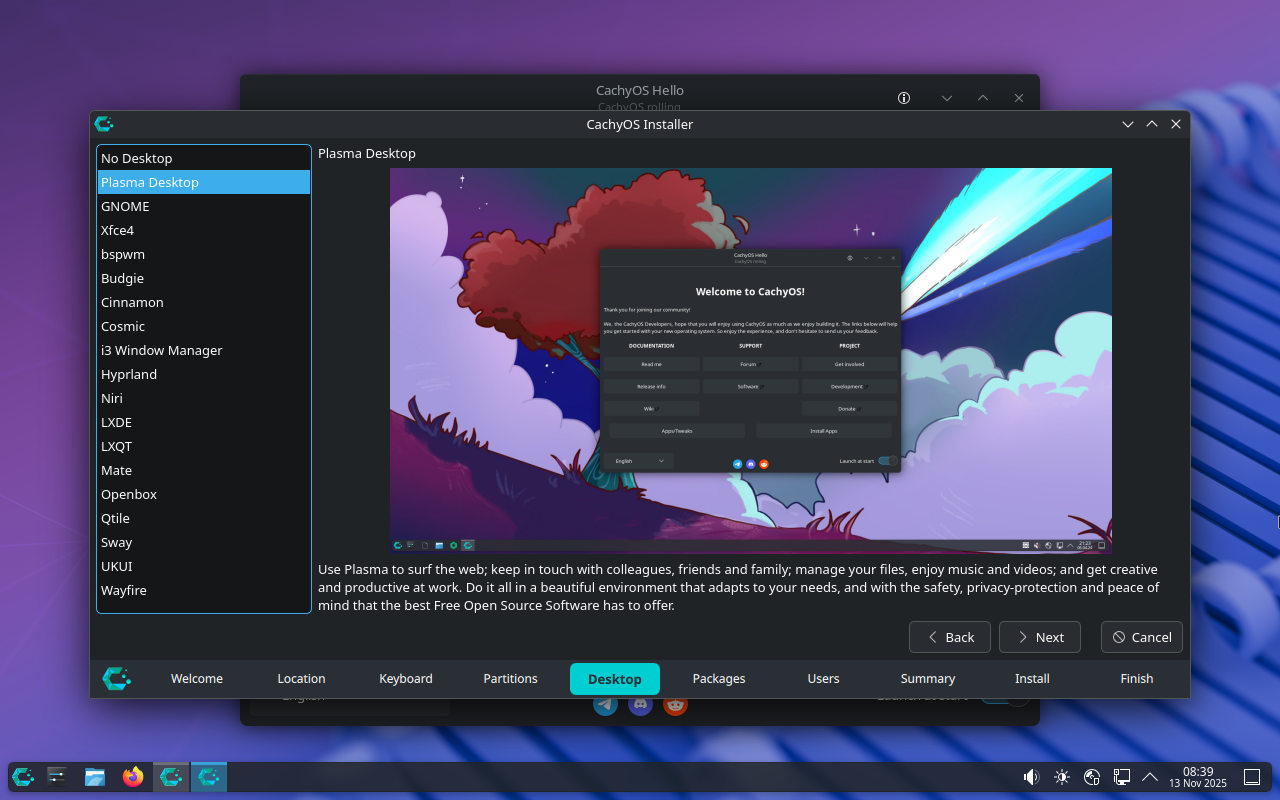
It’s very nice to not have a dozen different versions of the same distro to parse through and figure out that are simply the same distro with a different DE. Moreover, very few of them offer this many options.
Cachy could be doing a better job explaining what the user is looking at here and who each of these is for. Pretty easy to sum up in 1-2 sentences…
It’s nice, but how much can this help you chose a DE without further research? Just by desktop pic that you can often change the layout?
Anyway, at least openSUSE (outside of Proxmox Tumbleweed is the only thing I’ve installed for years now) offers this (with less options) on install too, but mostly I feel like anyone done choosing a distro also knows a bit about DEs. That’s why the des on your pic is just a generic promo that can’t explain how the DE feels or how it compares to others.
I see this as a very nice & pleasant UI (Calamares?) feature tho & it’s nice if it’s getting traction - but I’m not sure how much it helps new users - what guides them? Or for that matter how to switch between DEs if you install more than one?
I always thought they should have a 15 second gif for each DE showing off the general form factor. That looks and feel is all most people care about.
Yes, this would be the real deal!
Maybe a few smaller ones bcs full-screen-res gifs would be very hw intensive, but this would def help me to give me a general vibe of how this distro with that DE would feel like.
(Then again, websites are kinda made for this purpose, tho a few MBs more in the boot/installer iso wouldn’t hurt. Minimal versions of distros are usually separate either way.)
It’s not supposed to. If they did this the way most do, they would have 20 different distros listed on their webpage.