

2·
21 hours agoWait, I am supposed to care about .pacnew files?
Anyway, so far all I found there is new optional dependencies.
I rather wonder what happens when manual intervention is needed, like when JDK started being in conflict with JRE.

I like computers, trains, space, radio-related everything and a bunch of other tech related stuff. User of GNU+Linux.
I am also dumb and worthless.
My laptop is ThinkPad L390y running Arch.
I own RTL-SDRv3 and RSP1 clone.
SDF Unix shell username: user224
Wait, I am supposed to care about .pacnew files?
Anyway, so far all I found there is new optional dependencies.
I rather wonder what happens when manual intervention is needed, like when JDK started being in conflict with JRE.

I was just looking if something like that exists yesterday, but got disappointed. Nice timing.

Sorry about my Waypipe misunderstanding.
vncserver I configured that way, so of course. I just didn’t expect it to connect to Wayland.
If invoking xfce4-session works, it means you are doing so over vnc, not waypipe.
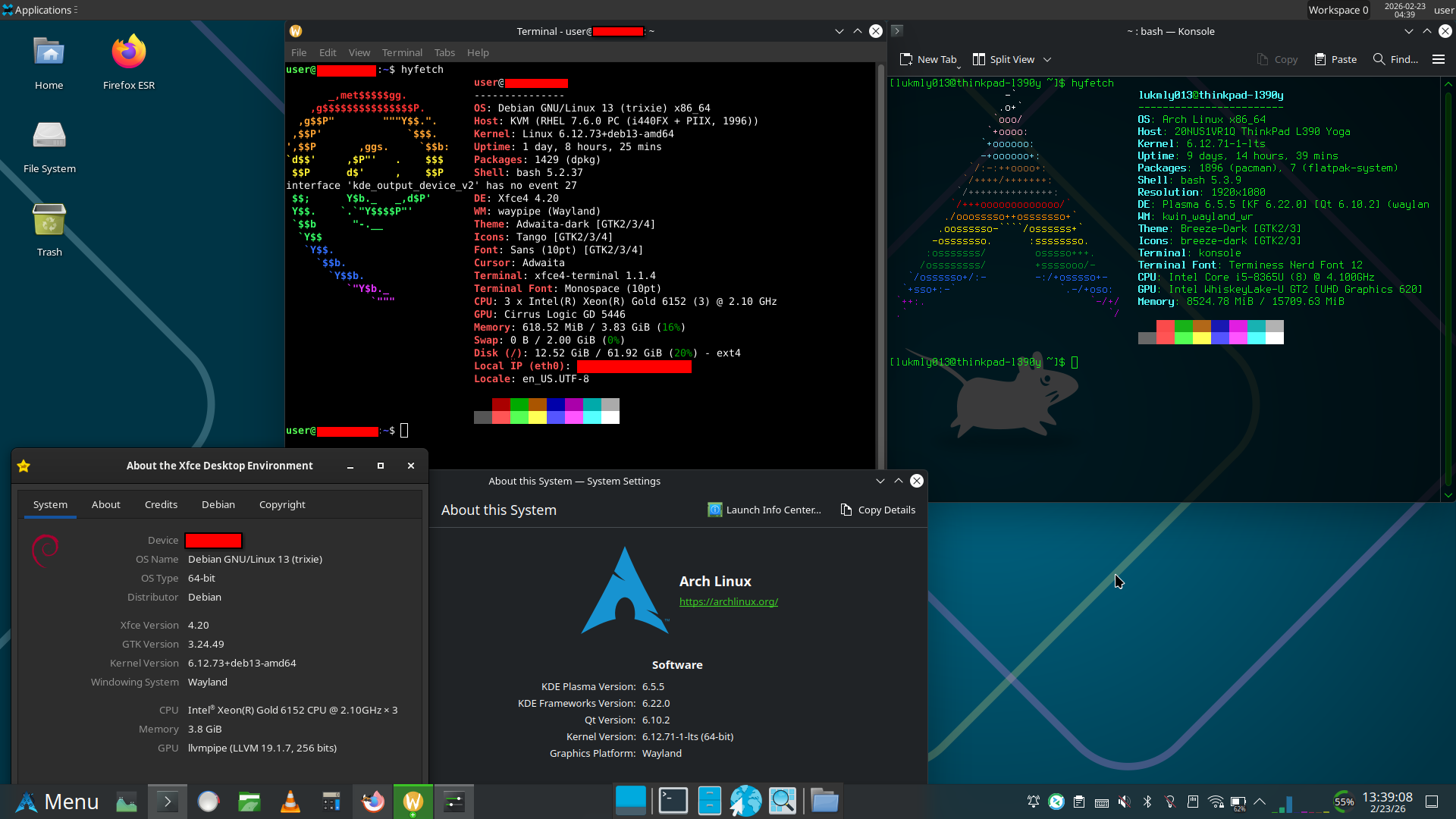
It does work over Waypipe. You can even see in my screenshot that on the remote machine it shows Waypipe as the WM.
The remote is running Debian 13, with multi-user.target set as default target to keep the GUI from starting. XFCE version is 4.20.1.
Using Waypipe, which proxies Wayland program GUIs to my local computer, just like ssh -X, but with Wayland, and it actually works over the internet (read: high latency).
I didn’t know XFCE supported Wayland , so I casually ran vncserver, which launched xfce4-session, except that it attached itself to the Wayland display (proxied to my local machine) rather than X display of TigerVNC. And here come the full XFCE right to my local machine (which is running Plasma).
Only if the machine is on LAN. I am running with 250ms here.
No, I was not using VNC. VNC xstartup script just launched xfce4-session which connected to Waypipe rather than Xtigervnc.
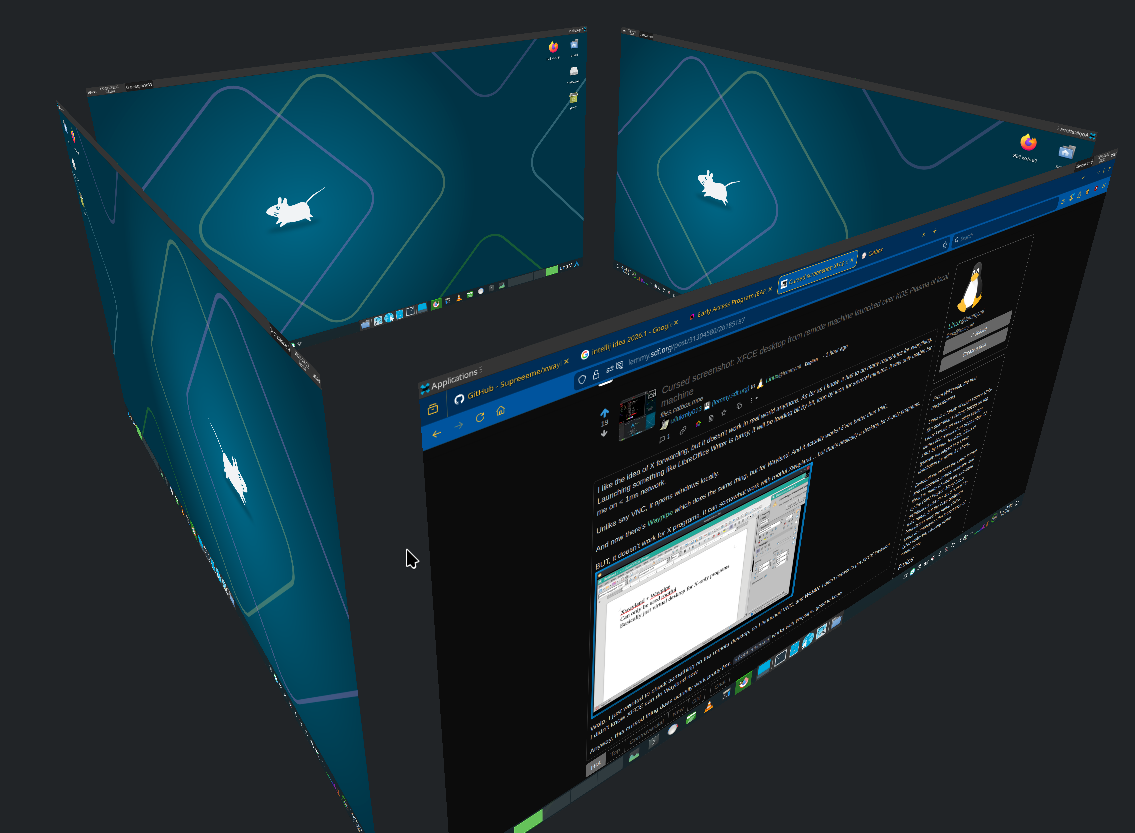
It does integrate itself to KDE nicely. Even with virtual desktops. And it even properly does the animations. Downside is, I can’t access the original desktop on my laptop while it’s running. Peek at desktop also shows XFCE.
Here’s the cube switcher, showing XFCE instead:
Probably snaps too.
I am still triple checking when I see /dev/sda as a target drive in such utilities. I use NVMe, so nowadays that’s probably a flash drive for me, but it still gives me adrenaline when I notice it.
I don’t know if it should be a bad thing. Inside the tar archive the configs were already organized into their respective dirctories, this way with --preserve-permissions --overwrite I could just quickly add the desired versions of configs.
Some examples of contents:
-rw-r--r-- root/root      2201 2026-02-18 08:08 etc/pam.d/sshd
-rw-r--r-- root/root       399 2026-02-17 23:22 etc/pam.d/sudo
-rw-r--r-- root/root      2208 2026-02-18 09:13 etc/sysctl.conf
drwx------ user/user         0 2026-02-17 23:28 home/user/.ssh/
-rw------- user/user       205 2026-02-17 23:29 home/user/.ssh/authorized_keys
drwxrwxr-x user/user         0 2026-02-18 16:30 home/user/.vnc/
-rw-rw-r-- user/user        85 2026-02-18 15:32 home/user/.vnc/tigervnc.conf
-rw-r--r-- root/root      3553 2026-02-18 08:04 etc/ssh/sshd_config
Keeps permissions, keeps ownership, puts things where they belong (or copies from where they were), and you end up with a single file that can be stored on whatever filesystem.
Yakuake terminal: https://apps.kde.org/yakuake/

Eh, the market will adapt.
I’ve been looking at components on AliExpress. Even now, there’s lots of X99-based motherboards with LGA2011-3 sockets that can take both regular DDR4 (with some limitations) and ECC DDR4.
But the descriptions are quite hard to understand, and they are apparently quite picky about which RAM will work with them.
I could get a combo of one of those motherboards with 2 Intel Xeon E5-2680 V4 CPUs (2.4GHz, 3.3GHz turbo, 28 cores, 56 threads in total) (hey, a dual CPU motherboard) for €120. And it’s got 8 RAM slots. So 32GB just with cheap 4GB sticks.
I can imagine it being nice for a tablet. They even have programs for calls and SMS if you have a cellular modem.
Wait what? I still remembered it as a recent console…
I feel like my brain is stuck. When I think of most powerful GPU, my brain’s muscle memory replies with 1080 Ti.
As a student, most things are more interesting than studying.
They really do just look like a cartel: https://youtu.be/EG7bqoDJ9L4
Same, but also for TrackPoint. I have the touchpad disabled. I don’t need to move my hand away from keyboard, I can endlessly scroll through pages at varying speeds just by finger pressure, and even cooler, I can scroll sideways just as easily. Oh, and I can also scroll both vertically and horizontally combined, to just easily navigate in the 2D space, pretty cool.
Although I also use the touchscreen a lot. I don’t want a regular laptop anymore. Unfortunately the 360 ThinkPads seem a bit rare when trying to find a used one.
Let me check what I could get if I tried to buy it new.
ThinkPad L13. Intel Core Ultra 5 125U, 16GB LPDDR5, 512GB SSD, 1920x1200 IPS, WiFi 6E, plastic body. €1,398.76 with 3% student discount. That seems overpriced, at the very least for my use case.
I think you’re forgetting femboys.
OK, you explained it well to me with the car example. I am not a car person, all I know about them is they can usually move, but I am not really interested to learn more.
I actually thought I was having issues with Debian. I was only getting like 6 - 8 updates when I tried to do them, even after a longer period of time. I kept searching around how to update Debian properly, but found no good answer.
Then something like 2 months later there was a large number of updates at once. So it is working then, huh.








Here you go:
